What is A Nanny Cam? Complete Information and Use

What is a Nanny Cam

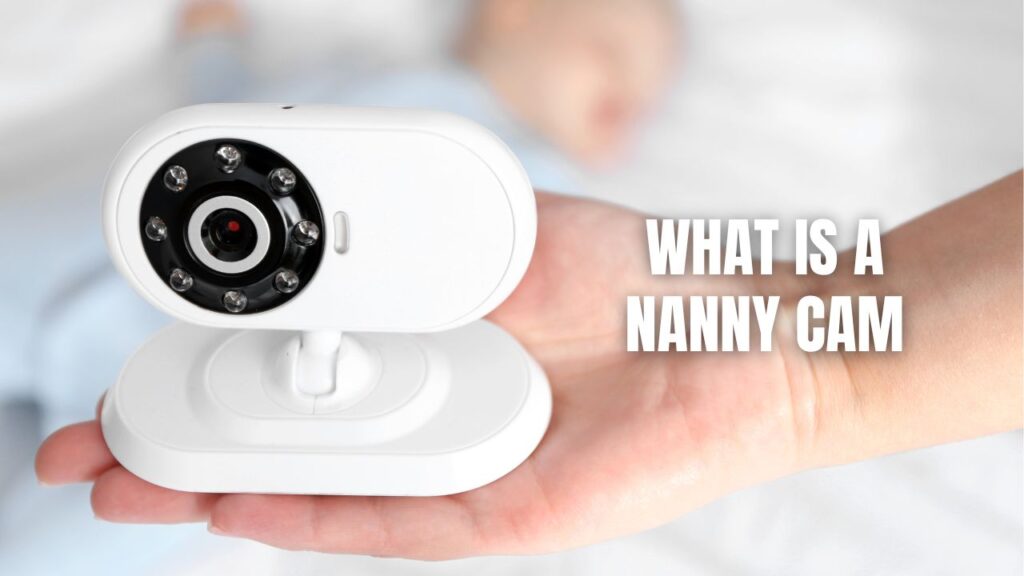
A nanny cam is a surveillance device we use to keep tabs on our children, caregivers, and household activities when we’re not physically present. These specialized monitoring systems—whether tucked away discreetly or placed in plain sight—give us real-time visibility into what’s happening at home, offering parents the reassurance they need about their kids’ safety and the quality of care they’re receiving.

We’ve all been there: leaving our little ones with someone new or heading to work while wondering if everything’s going smoothly back home. That nagging worry is exactly why nanny cameras have become such popular tools for modern families. These aren’t just gadgets for the paranoid—they’re practical solutions that help us balance our busy lives while staying connected to what matters most. Whether we’re concerned about a new babysitter, want to check in on our pets during the day, or need to monitor elderly relatives receiving in-home care, these cameras serve as our eyes and ears when we can’t be there ourselves.

Key Takeaways:

  • Nanny cams let us monitor caregivers and children remotely through live video feeds or recorded footage accessible from our smartphones and computers
  • Two main types exist: hidden cameras disguised as everyday items (like clocks or teddy bears) and visible cameras that everyone can see
  • Modern features include motion alerts, night vision, two-way talking, and cloud storage making monitoring easier and more comprehensive than ever
  • Legal rules differ by location—we can typically record video in our homes, but audio recording sometimes requires consent depending on where we live
  • These cameras aren’t just for watching nannies—we also use them for elderly care monitoring, pet checking, and general home security purposes
Callaway security™ ad scaled

Understanding Nanny Cam Technology

When we talk about nanny cameras, we’re really discussing a whole category of home monitoring equipment that’s evolved significantly over the past decade. Gone are the days of grainy, hard-to-access footage. Today’s devices pack serious technological punch into surprisingly small packages.

The Basic Components

Every nanny cam system works through a few core elements working together. At the heart sits a tiny board camera—basically a miniature lens mounted on a circuit board that’s sometimes no bigger than a quarter. This little powerhouse captures everything happening in its field of view. The camera connects to either a recording device (like an SD memory card) or transmits footage through your home’s WiFi network to the cloud or directly to your phone.

Power sources vary depending on the design. Battery-operated models give us flexibility to place cameras anywhere without worrying about outlets or visible cords. These typically last several weeks to months depending on usage. Plug-in versions stay powered continuously but require an electrical outlet, which can sometimes give away their location if we’re going for a hidden setup.

How Video Gets to Our Devices

The magic happens through one of two primary pathways. WiFi-enabled cameras connect to our home internet network, streaming live footage that we can pull up anytime on our smartphones, tablets, or laptops. We get instant notifications when something happens, and we can tune in from the grocery store, our office, or even while traveling across the country. The downside? These cameras are dependent on stable internet connections and can potentially be detected by tech-savvy individuals who scan for WiFi signals.

SD card-based systems take a different approach. They record everything directly onto removable memory cards tucked inside the device. We don’t get live streaming with this setup, but the upside is huge: no internet requirement means no connectivity issues, no monthly cloud fees, and nobody can detect the camera through network scanning. Modern high-capacity cards can store up to 144 hours of footage, giving us nearly a week of continuous recording before we need to swap cards or review the content.

Types of Nanny Cameras We Can Choose From

Hidden Surveillance Devices

Hidden nanny cams are designed to blend invisibly into our home environment. These clever devices come disguised as ordinary household objects that nobody would think twice about. We’re talking about clock radios sitting on nightstands, picture frames displaying family photos on shelves, smoke detectors mounted on ceilings, stuffed animals in playrooms, books on shelves, USB chargers plugged into walls, and even decorative plants.

The whole point is concealment. When we need to monitor a situation without alerting the person being recorded—perhaps because we’re investigating concerns about potential mistreatment—these cameras do the job without tipping anyone off. The tiny lens openings are usually smaller than pinheads and positioned where they naturally blend with the object’s design.

Common Hidden Camera Disguises:

  • Clock radios with functioning displays and alarms
  • Air purifiers and air fresheners
  • Tissue boxes sitting on countertops
  • Wall-mounted smoke detectors and carbon monoxide alarms
  • Children’s stuffed toys and teddy bears
  • Decorative bookends and actual books with hollowed sections
  • USB phone chargers and power adapters
  • Picture frames and wall art

Visible Monitoring Systems

On the flip side, visible nanny cameras make no attempt to hide. These are the cameras we mount openly on walls, place on shelves, or position on furniture where everyone can clearly see them. The psychology here is different: instead of secretly recording, we’re using visibility as a deterrent. When babysitters, older kids, or visitors know they’re being watched, behavior tends to stay above board.

These systems often look like traditional security cameras or baby monitors. We might use adhesive mounts to stick them in corners, or position them on high shelves where they get a good view of the room. Many parents find this approach more comfortable ethically since everyone knows monitoring is happening. Plus, visible cameras often come with more robust features since they don’t need to fit inside disguised objects.

Essential Features That Make Nanny Cams Work Better

Night Vision Technology

Kids don’t stop needing care when the lights go out. That’s why night vision capabilities are absolutely essential for most of us. These cameras use infrared LED lights—invisible to human eyes—to illuminate rooms in complete darkness. The camera then captures this infrared light, converting it into clear black-and-white video that lets us see exactly what’s happening during naptime, bedtime, or those middle-of-the-night moments.

Quality matters here. Basic night vision might give us grainy footage that’s hard to make out, while high-end systems deliver crisp detail even in pitch-black conditions. Most cameras can see clearly up to 15-30 feet in the dark, which covers typical bedroom and living room spaces.

Motion Detection and Smart Alerts

We don’t want to sit glued to our phones all day watching live feeds. That’s where motion detection becomes a game-changer. These smart systems use algorithms to detect when something moves within the camera’s view. The moment activity happens—whether it’s the babysitter entering the room, our toddler waking from a nap, or even just the dog wandering through—we get an instant notification on our phone.

This feature serves dual purposes. First, it conserves storage space since the camera only records when something’s actually happening rather than capturing hours of an empty room. Second, it gives us peace of mind that we’ll know immediately if something requires our attention. We can set sensitivity levels too, avoiding false alerts from things like curtains moving in the breeze or shadows from passing cars.

Two-Way Audio Communication

Being able to hear what’s happening is crucial, but being able to talk back? That’s next-level. Two-way audio lets us communicate through the camera as if we’re using an intercom. If our child is crying and needs comfort, we can speak soothing words until help arrives. If we need to give the babysitter quick instructions about dinner or medication, we can relay that information instantly without making a phone call.

Important legal note: While video recording in our own homes is generally legal across most locations, audio recording has trickier rules. Some states require all parties to consent before we can record conversations. We need to check our local laws before using audio features, especially if we’re recording without telling the caregiver.

Live Streaming Capabilities

Live streaming is probably the feature most of us consider non-negotiable. It means we can pull up the camera feed anytime, anywhere, and see exactly what’s happening right at that moment. Whether we’re at the office, running errands, or traveling for work, a few taps on our phone screen connect us directly to our home.

The technology requires decent internet upload speeds on our home network and reliable data connection wherever we are. Most camera apps are pretty intuitive—just open the app, select the camera, and the feed appears within seconds. Some systems let us view multiple cameras simultaneously, which is handy when we’re monitoring different rooms.

Storage Solutions

We’ve got two main options for storing footage, and many cameras offer both.

Local SD Card Storage keeps everything recorded directly on a physical memory card inside the camera. This approach gives us complete control over our footage without monthly fees. High-capacity cards (128GB or 256GB) can store weeks of motion-activated clips. The downside is that if someone finds and damages the camera, we lose the evidence.

Cloud Storage uploads footage to secure servers maintained by the camera company. The major advantages are remote access to historical footage and protection from physical camera damage—even if someone destroys the device, our recordings are safe in the cloud. The tradeoff is typically a monthly or annual subscription fee, though many companies offer free tiers with limited storage duration.

Storage TypeProsConsBest For
SD CardNo monthly fees, complete privacy, large capacityLost if camera damaged, must physically retrieve cardBudget-conscious users who want full control
CloudRemote access anywhere, protected from damage, automatic backupMonthly costs, requires internet, privacy concerns for someUsers wanting maximum convenience and security
Hybrid (Both)Best of both worlds, redundancy protectionHigher initial costThose wanting complete peace of mind

Video Quality and Resolution

Crisp, clear footage makes all the difference when we need to see details. Modern nanny cameras typically offer 1080p Full HD resolution as the standard, with some high-end models pushing to 2K or even 4K. Higher resolution means we can zoom in on recorded footage to see facial expressions, read text on papers, or catch small details that might be important.

That said, ultra-high resolution comes with tradeoffs. Better video quality means larger file sizes, which eat through storage faster and require more bandwidth for streaming. For most monitoring situations, 1080p hits the sweet spot between clarity and practical file management.

Wide-Angle Viewing

Nobody wants to buy multiple cameras for one room. Wide-angle lenses solve this by capturing 110 to 140 degrees of view in a single frame. This broad perspective means one camera positioned in the corner can monitor nearly an entire room. Some advanced models even offer 180-degree or full 360-degree views, though these sometimes use fisheye lenses that distort the image edges.

When we’re positioning cameras, wide-angle capability matters tremendously. We can cover a whole nursery, living room, or playroom with a single device instead of needing multiple cameras with blind spots between them.

Why We Use Nanny Cameras Beyond Childcare

Monitoring Elderly Family Members

As our parents age, many need in-home care from professional caregivers or family members. Nanny cams serve as protective eyes when we can’t be there ourselves. We can verify that medications are being administered correctly, meals are being provided on schedule, and most importantly, that our loved ones are being treated with dignity and respect.

Elder abuse unfortunately happens more often than we’d like to think. Having cameras monitoring common areas provides both deterrence and documentation if concerns arise. Many families find that caregivers actually appreciate the transparency—it protects them from false accusations while ensuring quality standards are maintained.

Keeping Tabs on Our Pets

Our furry friends can’t tell us what happened while we were gone, but cameras can. Pet owners use nanny cams to check on anxious dogs, watch cats during the day, or monitor pets recovering from surgery or illness. We can see if medications are staying down, whether our pets are moving around normally, or if that new dog walker is showing up on time and treating our animals well.

Some cameras designed specifically for pet monitoring include treat-dispensing features or laser pointers we can control remotely to interact with our pets throughout the day. It’s like being able to virtually hang out with our animals during lunch breaks.

General Home Security

Nanny cams double as security cameras when we’re away. They record anyone entering our home—whether invited or not. Package deliveries, house cleaners, contractors doing repairs, or even potential intruders all get captured on video. Many home break-ins happen during daytime hours when burglars assume nobody’s home, so having monitoring active during work hours provides valuable protection.

The motion detection alerts mean we know immediately if someone enters our house unexpectedly. We can review footage to confirm it’s just the cleaner who arrived early rather than an emergency situation requiring police response.

Legal Considerations We Need to Know

Video Recording Laws

Here’s the good news: in most locations throughout the United States, we have every legal right to install cameras in our own homes for security purposes. Our house, our rules. We can monitor common areas like living rooms, kitchens, playrooms, and hallways without needing anyone’s permission.

The boundaries come with spaces where people have reasonable expectations of privacy. We cannot legally place cameras in bathrooms, changing areas, or guest bedrooms where people are sleeping. Those spaces are off-limits regardless of our concerns, and violating these privacy standards can result in serious legal consequences.

Audio Recording Consent

This is where things get tricky. Video-only recording is generally fine, but the moment we start recording audio, different rules apply. The United States has a patchwork of state laws regarding audio consent:

One-Party Consent States allow us to record conversations as long as one person involved knows about the recording—and since we’re the ones recording in our own home, that counts as consent.

Two-Party Consent States require everyone in the conversation to know they’re being recorded. In these locations, we need to inform caregivers that audio recording is happening.

The safer approach? Clearly inform anyone working in our home that monitoring is taking place. Post visible signs, mention it during interviews, and include notification in employment agreements. This transparency protects us legally while still allowing us to maintain oversight of our children’s care.

Selecting the Right Nanny Cam for Our Needs

Hidden vs. Visible: Making the Choice

The decision between hidden and visible cameras depends entirely on our situation and comfort level. Hidden cameras work best when we’re investigating specific concerns about a caregiver’s behavior and need unbiased documentation of what happens when nobody thinks they’re being watched. They’re also useful for monitoring teenagers who might alter behavior if they know they’re on camera.

Visible cameras make more sense for general monitoring when we’re not investigating concerns but simply want ongoing oversight. They tend to encourage better behavior from everyone involved and avoid the ethical gray areas that make some people uncomfortable with secret recording. Many families use visible cameras as their primary system, only switching to hidden monitoring if red flags emerge.

Battery-Powered vs. Plug-In Models

Battery-operated cameras give us ultimate flexibility in placement. We can put them anywhere without worrying about power cords or proximity to outlets. This versatility is especially valuable for hidden cameras disguised as portable objects. Modern batteries can last 2-6 months depending on usage, and we get low-battery alerts when it’s time to recharge or replace them.

Plug-in models never need battery changes and can record continuously without power concerns. They’re ideal for locations near outlets where we want 24/7 monitoring. The visible power cord can be a drawback for hidden setups but doesn’t matter for openly placed cameras.

Feature Prioritization

Not every camera needs every feature. We should prioritize based on our specific situation:

For infant monitoring: Night vision and two-way audio are must-haves so we can see and comfort babies during nighttime wake-ups.

For watching active toddlers: Wide-angle viewing and motion detection help us keep tabs on kids who move around constantly.

For investigating concerns: High-resolution video and local SD card storage ensure we have clear evidence that can’t be erased remotely.

For general peace of mind: Live streaming and smartphone alerts let us check in whenever we want without needing to review hours of footage.

Setting Up and Using Nanny Cams Effectively

Strategic Camera Placement

Where we put cameras matters as much as which cameras we choose. We want to cover areas where children spend most of their time—living rooms, playrooms, nurseries, and kitchens. Position cameras high and angled downward for the best viewing perspective. This vantage point captures faces clearly and reduces blind spots from furniture.

For hidden cameras, think about natural object placement. A clock radio belongs on a nightstand or dresser, not randomly sitting in the middle of a shelf where it looks out of place. Picture frames go on walls or shelves where photos would normally be displayed. The more naturally the disguised object fits into the room’s existing decor, the less likely anyone is to give it a second thought.

Avoid pointing cameras directly at windows or bright lights, which can wash out the image. Test the view using the live feed before finalizing placement—what looks like good positioning in person might have obstructions or glare issues on camera.

Managing Footage and Alerts

Most of us don’t have time to watch hours of video daily. That’s why smart management of footage and alerts is crucial. Set motion detection zones to focus on important areas and ignore spots with frequent false triggers like trees visible through windows or areas where pets constantly roam.

Configure alert sensitivity to match our needs. Too sensitive and we’ll get bombarded with notifications about every tiny movement. Too low and we might miss important events. Most apps let us adjust these settings, and it’s worth spending time finding the right balance.

Review footage regularly, even when nothing seems wrong. This habit helps us spot gradual changes in caregiver behavior or child development that might not trigger any single alert but represent patterns worth addressing.

Addressing Privacy and Trust Issues

Using nanny cameras raises legitimate questions about trust and privacy. Many people feel conflicted about monitoring someone they’ve hired, worried it signals distrust or creates an uncomfortable dynamic. Here’s how we can think about this balance:

Monitoring doesn’t mean we distrust our caregiver—it means we’re taking reasonable precautions to protect our most precious responsibility: our children’s safety. Professional, quality caregivers typically understand and accept this completely. In fact, many prefer working in homes with cameras because it protects them from false accusations while demonstrating the family’s commitment to child safety.

The key is transparency. When we’re upfront about monitoring from the start—during interviews, in employment contracts, and through visible cameras or posted notices—we’re not being sneaky or deceptive. We’re establishing clear expectations that professional childcare happens under supervision, which is entirely reasonable.

If we do use hidden cameras, we should have specific, serious concerns that justify covert monitoring. Using them just because we’re curious or want to spy without cause crosses ethical lines that most of us would find uncomfortable.

Troubleshooting Common Nanny Cam Issues

Connectivity Problems

WiFi cameras sometimes struggle with connection issues. If our live feed keeps dropping or won’t load, first check our home internet speed—uploads need to be at least 2-5 Mbps for smooth streaming. Move the router closer to the camera or add a WiFi extender if the signal is weak in that part of the house.

Many connectivity issues stem from network congestion. If multiple devices are streaming video or downloading large files simultaneously, camera feeds can suffer. Consider upgrading internet speeds if our household has heavy bandwidth usage.

Storage Management

Running out of storage space is frustrating, especially if it means we’re missing important footage. For SD card systems, use high-capacity cards (128GB minimum) and enable loop recording, which automatically overwrites the oldest footage when the card fills up. Check cards monthly and back up any important clips to separate storage.

Cloud storage users should review their subscription plans to ensure adequate space for retention needs. Most services offer tiered plans—if we’re consistently hitting storage limits, upgrading to the next tier prevents footage gaps.

Image Quality Issues

Blurry or grainy footage defeats the whole purpose. If video quality is poor, first clean the camera lens—smudges and dust significantly impact clarity. Check if the camera is trying to stream at too high a quality for our internet connection, causing compression artifacts. Lowering the resolution setting slightly can actually improve perceived quality by reducing stuttering and pixelation.

For night vision problems, ensure the area has adequate infrared illumination and no surfaces that reflect IR light back into the lens, creating washout. Some materials and surfaces react differently to infrared than visible light, occasionally causing unexpected glare.

Frequently Asked Questions About Nanny Cams

Can I legally use a nanny cam in my home?

Yes, we can generally use nanny cameras in our own homes legally across most of the United States. We’re allowed to place cameras in common areas like living rooms, kitchens, and playrooms where our children receive care. The main restrictions involve bathrooms, bedrooms, and other spaces where people have reasonable privacy expectations. Audio recording has separate rules in some states requiring consent from people being recorded, so we should check local laws before enabling audio features. The safest approach is informing caregivers about monitoring upfront, which protects us legally while maintaining transparency.

How much do nanny cameras typically cost?

Nanny cam prices range widely depending on features and quality. Basic models start around $30-50 for simple cameras with limited capabilities. Mid-range options with features like 1080p video, motion detection, and cloud storage typically run $80-200. High-end systems with advanced features like 2K/4K resolution, artificial intelligence detection, extended battery life, and premium cloud storage plans can cost $200-400 or more. Remember that WiFi cameras often come with monthly cloud storage fees ($3-15 per month) that add to the long-term cost, while SD card cameras have one-time purchase prices but may require occasional card replacements.

What’s the difference between nanny cams and baby monitors?

While there’s overlap, nanny cams and baby monitors serve slightly different purposes. Baby monitors focus specifically on infant monitoring, with features like breathing detection, temperature sensors, lullaby players, and dedicated parent units with simple interfaces designed for quick nighttime checks. Nanny cameras are broader home surveillance tools designed to monitor caregivers and older children, offering features like motion detection, cloud storage, and smartphone access for monitoring from anywhere. Many modern devices blur these lines—high-end baby monitors now include caregiver monitoring features, while nanny cams often work great for infant monitoring. The real difference is marketing and primary use case rather than technical capabilities.

Do nanny cameras record all the time or only when motion happens?

This depends entirely on how we configure the camera. Most nanny cams offer both continuous recording and motion-activated recording modes. Continuous recording captures everything 24/7, providing complete footage but consuming storage quickly and making it time-consuming to review. Motion-activated recording only captures video when the camera detects movement, conserving storage space and making it easier to find relevant clips. Many of us use continuous recording during specific hours when caregivers are present and motion detection overnight or when we’re home ourselves. The best approach depends on our storage capacity, monitoring goals, and how much footage we’re willing to review.

Can babysitters or nannies tell if they’re being recorded by hidden cameras?

Detecting hidden cameras requires deliberate effort and some technical knowledge. Completely hidden cameras disguised as everyday objects are very difficult to spot with the naked eye—that’s their whole design purpose. However, tech-savvy individuals can use smartphone apps that detect WiFi signals or infrared light from night vision LEDs to identify cameras. Hidden cameras that record to SD cards without WiFi are nearly impossible to detect without physically searching for them. Professional camera detectors can also find hidden devices, though most people don’t carry these tools. This is another reason why we should strongly consider being transparent about monitoring—playing cat and mouse with detection attempts creates an uncomfortable dynamic that undermines the trust essential to good childcare relationships.

Making the Right Choice for Your Family’s Safety

Bringing nanny cameras into our homes represents a significant decision about how we approach childcare oversight and family security. These devices offer us invaluable peace of mind and protection, letting us stay connected to what matters most even when work, errands, or other obligations keep us away. Whether we’re new parents learning to trust a caregiver for the first time, experienced families maintaining ongoing monitoring, or adult children concerned about elderly parents receiving in-home care, the right camera system provides reassurance that our loved ones are safe and well-treated.

The technology has never been more accessible or affordable. Modern nanny cameras pack professional-grade features into user-friendly packages that we can set up in minutes and monitor from anywhere in the world. From crystal-clear night vision that lets us check on sleeping babies to motion alerts that notify us the instant something happens, these systems give us capabilities that seemed like science fiction just a decade ago.

At the same time, we need to use these powerful tools responsibly and ethically. Transparency with caregivers, respect for privacy boundaries, understanding legal requirements, and maintaining focus on child safety rather than unnecessary surveillance—these principles help us strike the right balance between protection and trust. When implemented thoughtfully, nanny cameras enhance rather than undermine the relationship between families and caregivers, creating accountability and documentation that benefits everyone involved.

Ultimately, there’s no single perfect camera or approach that works for every family. Our specific needs, concerns, budget, and comfort level with technology all factor into which system makes the most sense. The good news is that the variety of options available today means we can find solutions tailored precisely to our situation, whether that’s a simple visible camera for general monitoring or a sophisticated hidden system for investigating serious concerns.

What matters most isn’t the specific device we choose, but that we’re taking active steps to ensure our children’s safety and our own peace of mind. In a world where we can’t always be physically present but still carry the weight of keeping our families safe, nanny cameras give us the next best thing to being there—clear visibility into the care our loved ones receive and the security of knowing that everything happening in our homes is under our watchful, protective care.

Contact Callaway Security™ to learn more.

Callaway Security Logo

Looking for Home Security?

We're Just A Call-Away!