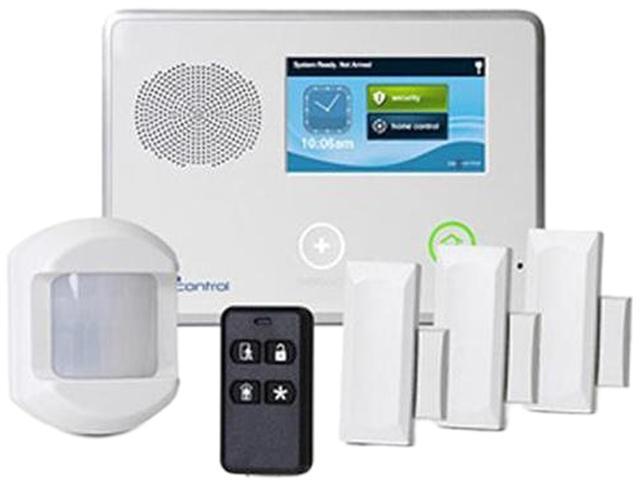
On a security system, the term “AC” refers to alternating current power, which is the primary source of energy for the system. This two-letter code tells us that our system is plugged into wall power and operating normally, drawing energy from the electrical grid rather than relying on its backup battery.
Understanding what alternating current means for our home security becomes crucial when things go wrong. If we suddenly see “AC Loss” or “AC Trouble” flashing on our panel, it’s our system’s urgent way of telling us that something’s interrupted the main power supply. At that moment, our security system switches to battery backup – but that backup won’t last forever.
Key Takeaways:
- AC stands for alternating current – the main electrical power that runs our security systems through wall outlets
- AC indicators show power status – when displayed, it means our system is receiving normal electrical supply
- AC Loss warnings signal trouble – these alerts mean our system lost main power and switched to battery backup
- Backup batteries have limited runtime – most security systems can only run 8-24 hours on battery power alone
- Quick troubleshooting saves the day – checking plugs, transformers, and connections often resolves AC power issues
- Professional monitoring continues – even during AC loss, our monitoring service typically stays connected via cellular backup
- Generator power can help – backup generators can restore AC power during extended outages

Understanding AC Power in Home Security Systems
What Alternating Current Really Means
Alternating current represents the standard electrical power flowing through our home’s wiring system. Unlike direct current (DC) that flows in one direction, alternating current changes direction many times per second – specifically 60 times per second in North American homes. Our security systems need this steady AC supply to operate all their components: control panels, sensors, keypads, sirens, and communication modules.
The beauty of AC power lies in its consistency and availability. As long as our local electrical grid stays up and running, our security system receives continuous power without interruption. This reliability allows our system to charge its backup battery while simultaneously powering all protection features around the clock.
How Security Systems Use AC Power
Our security systems connect to AC power through special transformers that convert high-voltage household current (typically 120 volts) down to low-voltage power (usually 12-24 volts) that’s safe for electronic components. These transformers plug directly into standard wall outlets, creating a bridge between our home’s electrical system and our security equipment.
When AC power flows properly, our security system performs multiple functions simultaneously. It energizes all sensors throughout our home, maintains communication with monitoring stations, keeps keypads illuminated and responsive, charges the backup battery to full capacity, and powers any additional features like cameras or smart home integrations.
Recognizing AC Power Status Indicators
Normal AC Operation Signs
When our security system shows “AC” or displays a steady AC light, we’re seeing confirmation that everything’s working as designed. Different manufacturers use various ways to indicate proper AC power status – some show green lights, others display “AC OK” messages, and newer systems might show power icons on touchscreen panels.
We should become familiar with our specific system’s normal AC indicators. During regular operation, we might see steady lights, hear brief beeps during system tests, or notice displays showing voltage readings. These all signal that our AC power supply remains stable and our security system stays fully operational.
AC Loss Warning Systems
Security systems immediately detect when AC power disappears and alert us through multiple warning methods. We might hear distinctive beeping patterns, see flashing red lights, receive text messages or phone calls from our monitoring company, or notice “AC Loss” messages on our control panel displays.
These warnings serve a critical purpose – they let us know our system switched to battery backup and give us time to address the power issue before the battery runs out. Most systems will continue beeping periodically until AC power returns or until we acknowledge the trouble condition.
Common Causes of AC Power Loss
Power Outages and Grid Issues
The most obvious cause of AC loss happens when our local electrical grid experiences problems. Storms, equipment failures, planned maintenance, or high demand can all interrupt power to our neighborhood. During these outages, our security system automatically switches to battery backup and continues protecting our home.
We can’t control utility outages, but we can prepare for them. Understanding how long our system’s battery typically lasts helps us plan accordingly. Most residential security systems provide 8-24 hours of battery backup, depending on the system size and battery capacity.
Transformer and Connection Problems
Sometimes AC loss occurs even when our house has power. Loose transformer plugs, damaged power cords, or failed transformers can interrupt power flow to our security system. We might find transformers unplugged from outlets, especially after cleaning or moving furniture near the security panel.
Checking these connections should be our first troubleshooting step when we see AC loss warnings. We can visually inspect the transformer plug, ensure tight connections at the security panel, and verify that the outlet itself has power by testing it with another device.
Electrical Circuit Issues
Tripped circuit breakers or blown fuses can cut AC power to our security system’s outlet. If our security system shares a circuit with high-power appliances, electrical overloads might trip the breaker and interrupt power flow. We should check our home’s electrical panel when experiencing unexplained AC loss.
Some older homes have security systems connected to circuits that also power garage door openers, workshop tools, or kitchen appliances. During heavy electrical usage, these circuits might overload and trip, causing our security system to lose AC power unexpectedly.
Troubleshooting AC Power Issues
Basic Connection Checks
When our security system shows AC loss, we should start with simple visual inspections. First, we’ll check that the transformer stays firmly plugged into the wall outlet. Then we’ll verify that wires connecting the transformer to our security panel remain secure and undamaged.
Testing the outlet itself helps determine whether the problem lies with our electrical system or the security equipment. We can plug a lamp or phone charger into the same outlet to confirm it has power. If the outlet works but our security system still shows AC loss, the transformer might need replacement.
Professional vs. DIY Solutions
Simple connection issues often require basic DIY fixes – plugging in loose transformers, resetting tripped breakers, or replacing obviously damaged power cords. However, more complex electrical problems warrant professional attention from qualified technicians or electricians.
We should call professionals when we find damaged wiring, suspect transformer failures, or discover electrical panel problems. Attempting electrical repairs without proper training can be dangerous and might void our security system warranty.
Battery Backup During AC Loss
How Long Batteries Last
Most residential security systems provide limited battery backup during AC power loss. Typical backup times range from 8-24 hours, depending on system size, battery age, and active features. Larger systems with more sensors and devices drain batteries faster than basic setups.
We can extend battery life during outages by temporarily disabling non-essential features. Some systems allow us to reduce display brightness, disable certain sensors, or limit communication attempts to conserve battery power for critical functions.
Battery Maintenance Tips
Regular battery maintenance ensures maximum backup time when we need it most. We should replace backup batteries according to manufacturer recommendations – typically every 3-5 years. Older batteries lose capacity and might not provide adequate backup duration during emergencies.
Testing battery backup periodically helps verify our system’s emergency capabilities. Many security systems include built-in battery tests that we can run monthly to confirm proper backup operation.
Impact on Security System Functions
What Continues Working
During AC loss, our security system’s core protection features typically continue operating on battery power. Sensors remain active, the control panel stays responsive, and most systems maintain communication with monitoring stations through cellular backup connections.
Entry and exit delays still function normally, allowing us to arm and disarm our system as usual. Motion detectors, door contacts, and window sensors continue monitoring for intrusions, and the system will sound alarms if triggered during battery operation.
Features That May Be Limited
Some advanced features might be disabled or limited during battery backup to conserve power. These could include display backlighting, voice prompts, certain smart home integrations, or continuous camera recording. Systems prioritize essential security functions over convenience features when running on battery power.
Communication with monitoring stations might shift from landline or broadband connections to cellular backup during power outages. This transition usually happens automatically, but we should verify that our monitoring service includes cellular backup coverage.
Modern Security System Power Management
Smart Power Features
Newer security systems include intelligent power management that optimizes battery life during outages. These systems can automatically disable non-critical functions, reduce communication frequency, or adjust display settings to maximize backup time.
Some advanced systems provide detailed power status information through smartphone apps, letting us monitor battery levels remotely and receive low-battery warnings before the system shuts down.
Integration with Home Backup Power
Security systems can integrate with whole-house generators or battery backup systems for extended protection during power outages. These backup power solutions automatically restore AC power to our security system, eliminating concerns about limited battery life.
Uninterruptible power supplies (UPS) designed for security systems can bridge the gap between utility power loss and generator startup, ensuring continuous AC power throughout any electrical transition.
Monitoring Service Considerations
Professional Monitoring During Outages
Our professional monitoring service typically continues operating during AC power loss through cellular backup communications. Monitoring stations receive signals about power loss and can verify our system’s operational status even when running on battery power.
We should confirm that our monitoring service includes cellular backup and understand any limitations during extended outages. Some services might adjust monitoring protocols or contact procedures when systems operate on battery power for extended periods.
Self-Monitoring Options
For self-monitored systems, AC power loss might affect our ability to receive alerts through internet-connected devices. However, most modern self-monitoring systems include cellular backup or multiple communication paths to ensure continued connectivity during power outages.
We can enhance self-monitoring capabilities by ensuring our smartphone stays charged and maintaining alternative communication methods like landline phones during extended power outages.
Prevention and Preparedness Strategies
Regular System Maintenance
Preventing AC power issues starts with regular system maintenance and inspections. We should periodically check transformer connections, test backup batteries, and verify that electrical circuits remain properly protected and functioning.
Creating maintenance schedules helps ensure we address potential power issues before they cause system failures. Simple monthly checks can identify loose connections, aging batteries, or electrical problems that might interrupt our security system’s AC power supply.
Emergency Planning
Developing emergency plans for extended power outages helps us maintain home security even when our system’s battery backup becomes exhausted. These plans might include portable generators, alternative security measures, or coordination with neighbors for additional protection.
Understanding our local utility’s typical outage duration helps us prepare appropriate backup power solutions. Areas prone to extended outages might benefit from generator installations or expanded battery backup systems.
| Power Source | Duration | Reliability | Cost |
|---|---|---|---|
| AC Power | Continuous | Very High | Low |
| Battery Backup | 8-24 Hours | High | Medium |
| Generator | Days/Weeks | High | High |
| UPS System | 1-4 Hours | Very High | Medium |
People Also Ask
What should we do when our security system shows AC loss?
When our security system displays AC loss, we should first check that the transformer remains plugged into the wall outlet and verify the outlet has power by testing it with another device. If connections look good and the outlet works, we might have a transformer failure requiring professional replacement.
How long will our security system work without AC power?
Most residential security systems provide 8-24 hours of battery backup during AC power loss, depending on system size and battery condition. Larger systems with more devices typically drain batteries faster than basic setups with fewer components.
Can our security system still call for help during AC loss?
Yes, professional monitoring typically continues during AC power loss through cellular backup communications. Our monitoring station receives alerts about the power loss and can still respond to security alarms, though they might follow different protocols for systems running on battery power.
Will our security cameras work during AC power loss?
Basic security system functions like sensors and alarms usually continue during AC loss, but cameras and other power-hungry devices might be disabled to conserve battery. Some systems allow us to prioritize certain cameras or features during battery operation.
Should we reset our security system after AC power returns?
Most security systems automatically return to normal operation when AC power resumes, but we should verify that all functions work properly and clear any trouble indicators. Some systems might require manual acknowledgment of the AC loss condition before returning to normal status.
Ensuring Continuous Home Protection
Understanding what “AC” means on our security system empowers us to maintain reliable home protection even during power disruptions. When we see that simple two-letter display, we know our system draws power from the electrical grid and operates at full capacity. When AC loss warnings appear, we understand the urgency of addressing power issues before battery backup becomes exhausted.
We’ve learned that alternating current serves as the lifeblood of our security systems, enabling continuous monitoring, sensor operation, and communication with professional monitoring services. The backup battery provides crucial protection during temporary power loss, but we can’t rely on it indefinitely.
Regular maintenance, proper troubleshooting knowledge, and emergency preparedness help ensure our security systems continue protecting our homes regardless of power conditions. By staying informed about our system’s power requirements and warning signals, we maintain the reliable protection our families deserve around the clock.